
Create video ads in minutes with Addrop
You can launch a product quickly, but producing enough video ad concepts to test can still slow you down.
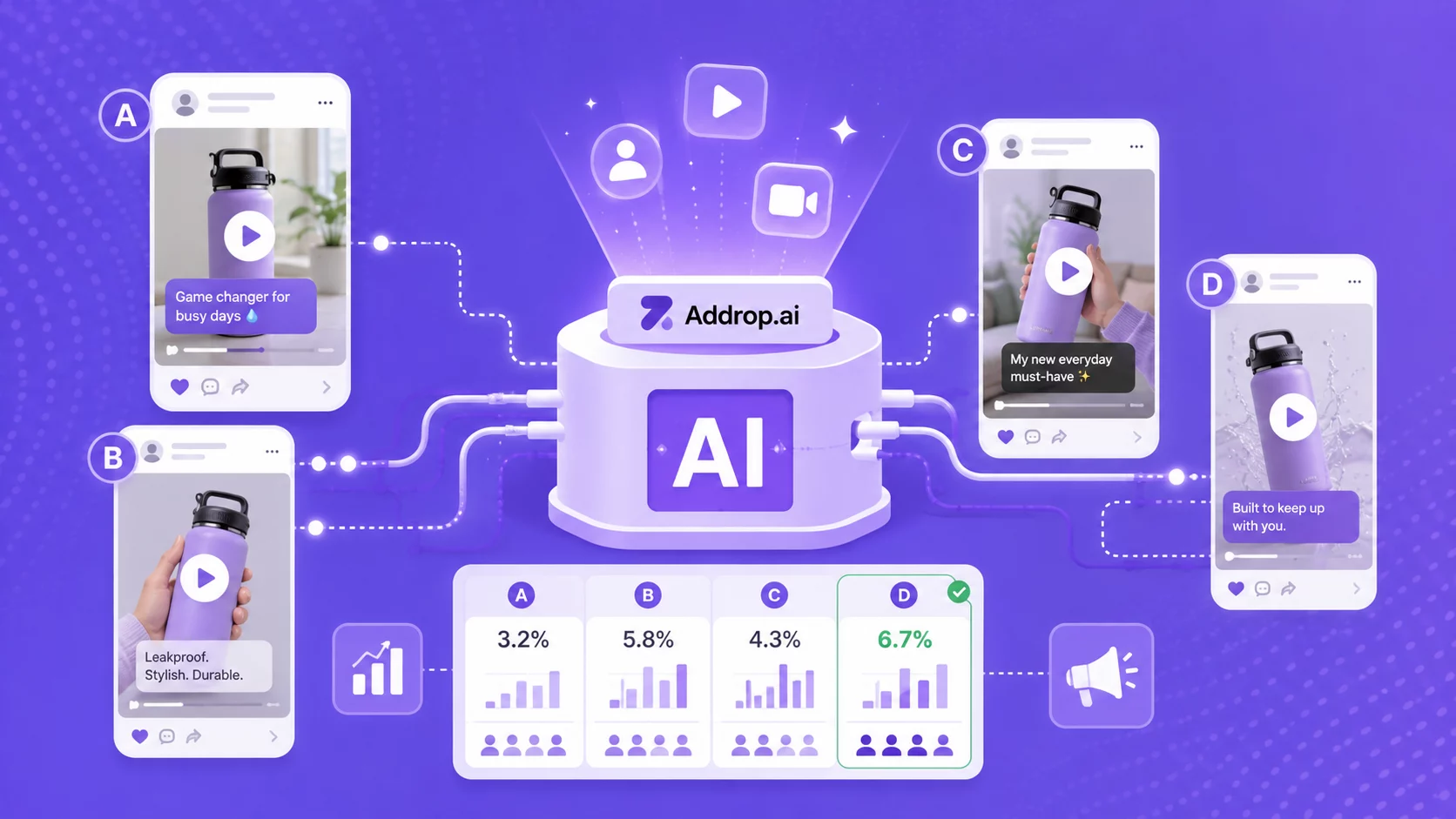
An AI ad generator for dropshipping turns a product link or image into a script, AI-presenter video, captions, and a vertical social ad. For a growing e-commerce or Shopify store, that means producing more dropshipping video ads and testing more ad creatives without scheduling a new shoot for every angle.
With Addrop, you add a product, choose an AI creator style, select or edit a hook, and generate a video for TikTok, Instagram Reels, or YouTube Shorts in minutes.
By the end, you will know what Zendrop’s AI video ad generator produces, how to turn one product into a useful test batch, how Addrop pricing and credits work, and where AI-generated creative still needs human judgment.
Create your first AI video ad with Addrop
Join 500,000+ entrepreneurs using Zendrop to find products, test ideas fast, and launch scroll-stopping video ads without hiring creators or learning editing.
Generate your first video ad →
Key takeaways
- An AI video ad generator creates the first draft of the ad: Addrop can turn a product link or image into a UGC-style vertical video without a camera or editing timeline.
- The guided workflow is simple: add a product, choose an AI creator style, select or edit a script, review the output, and download the finished video.
- Addrop is an AI-powered tool made for e-commerce workflows: eligible Zendrop sellers can import catalog products, while other inputs include a Shopify product link, another product URL, or an image.
- Speed makes testing easier, not automatic: build controlled variants, check every claim, and use the AI-content labels or disclosures required by the platform and market where the ad will run.
What an AI ad generator does for an e-commerce store
An AI ad generator combines product information, a script, voiceover or synthetic presenter, captions, and a social-video layout. Depending on the tool, you may start creating your video by using a text prompt, product URL, catalog item, image, or existing asset.
For a dropshipper, you can test things fast. Products and storefronts can move quickly, but traditional video production can take longer (think: finding the right creator with the right editing style you’re going for, reaching out to them, sending them concepts, waiting to hear back, sending a contract, seeing if they’ll agree to the contract terms, shooting the video, sending it to you, etc, etc, etc, aren’t you already exhausted?).
A product-focused dropshipping ad maker helps you create more concepts and iterate on dropshipping video ads before committing a larger production budget.
You’ll have to test several products, messages, and hooks before you know what resonates. An AI product ad generator is one practical way to increase creative volume without coordinating a separate shoot for every concept.
What “UGC-style” means: UGC stands for user-generated content. An AI-presenter ad can imitate the direct-to-camera pacing and casual visual language of UGC, but it is not an actual customer testimonial. Call it UGC-style and avoid scripts that imply the synthetic presenter personally bought, used, or benefited from the product.
Don’t want to be in your own product videos? No problem!
How Addrop’s product-to-video workflow works
Addrop produces a finished 9:16 or 16:9 video with an AI presenter, spoken script, captions, and short-form pacing for TikTok, Reels, and Shorts. Its AI avatars give you different presenter styles without requiring you to assemble the output on a blank editing timeline.
For example, let’s say you’re selling this radio frequency beauty device:
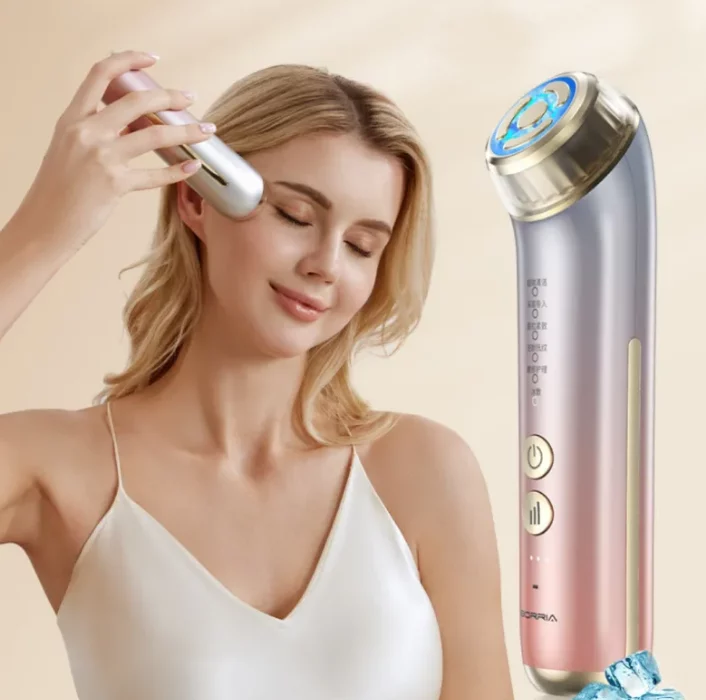
You can upload your product image into Addrop. Then, give your product a name, a very specific description. The more specific, the better as it will determine just how convincing the script and UGC creator will be:

After clicking Add Product, you will select your AI avatar, pick whether you want 9:16 or 16:9, choose an emotion for your script and generate your ad.

Here’s the first video we created using the prompt:
And then we regenerated another ad variation:
Addrop renders the vertical or horizontal video and stores it in the Video Library for download. Watch the full export, check the first two seconds with and without sound, and fix any caption, voice, image, or claim problem before downloading and launching.
Before you publish: verify that the product image, specifications, price, offer, captions, pronunciation, and claims match the landing page. Do not use an AI presenter to fabricate personal experience, health results, or a customer endorsement. Add the disclosures required by the ad platform and applicable law.
A first-run checklist for your first AI video ad
Use this checklist to avoid spending credits on preventable mistakes.
Whether you use an AI ad maker for finished videos, the quality of the product input and creative brief still shapes the output.
Pick a visual product with one clear benefit. Ask whether a viewer can understand the problem and payoff in a short demonstration. Products that require a long explanation may need a different ad format.
Use the catalog import or your strongest product image. Confirm that the name, specifications, images, and offer match the landing page before generating.
Match the presenter to the setting and brand tone. Choose a credible context without implying that the avatar is a real customer, employee, or expert.
Read the script out loud. Tighten the hook, remove generic hype, and delete any first-person claim the synthetic presenter could not truthfully make.
Review the first two seconds with sound off, then watch the full ad with sound on. Captions should make the opening understandable, while the voice, product image, and CTA should remain accurate throughout.
Generate one clean control first. Once it passes review, use it as the baseline for a controlled set of hook or avatar variants.
Related article: How to Start Dropshipping in 2026
Addrop vs. a general AI video generator
“AI ad generator” is a pretty broad label. Some tools make static ads, some turn product pages into videos, and others give you a blank canvas for generating or editing almost any kind of video.
So, rather than comparing every “AI ad generator” feature for feature, start with the job you need it to do. If you want to turn a product into a creator-style ad with as little setup as possible, a focused tool like Addrop may be the better fit. If you want more control over formats, scenes, or editing, a broader video generator may make more sense.
| What matters | Addrop | A general AI video tool |
| Primary job | UGC-style vertical product ads for e-commerce testing | Broad video creation: explainers, social clips, brand content, or ads |
| Starting input | Product link, image, or eligible Zendrop catalog item | Prompt, script, URL, template, or uploaded assets, depending on the tool |
| Access and pricing | Eligible Zendrop plan with monthly credits; standalone credit packs are available | Often subscription, seat, or usage based |
| Workflow | Product -> avatar -> script -> review -> generate | Varies from guided templates to a full timeline editor |
| Creative control | Fast, guided choices with fewer timeline decisions | Often more format, layout, scene, and editing control |
| Best fit | Zendrop sellers testing UGC-style vertical product ads | Teams that need multiple video formats or deeper editing |
The tradeoff is focus versus flexibility. A dropshipping ad maker is a strong fit when the job is to turn a product into several UGC-style vertical video concepts quickly. A general AI video tool can be a better fit when the team also needs explainers, brand films, landscape video, LinkedIn ads, reusable brand kit controls, or detailed timeline editing.
Try it on a real product
Pull a product from the Zendrop catalog or use your own image, then generate a reviewable video concept.
Start creating your ad now →
How to create scroll-stopping video ads
1. Hooks that stop the scroll
The first few seconds of your ad have one job: give someone a reason to keep watching.
A strong hook can help, but it can’t do all the work on its own. It should set up something the rest of the ad can actually show or explain, whether that’s a product benefit, a demonstration, or an answer to a common question.

Take a cordless fabric shaver. It’s a useful example because the problem is easy to recognize, the product is simple to show in action, and the result is immediately visible.
Here are a few ways you could approach the hook:
- Problem-first: Start with a frustration your audience will recognize. “If your sweaters pill after a few wears, watch this.”
- Result-first: Show people what they’re about to see. “See the difference this fabric shaver makes in one pass.”
- Curiosity-first: Give people a reason to stick around for the explanation. “This is why your favorite sweater looks older than it is.”
- Callout: Speak directly to the person you’re trying to reach. “Sweater owners: try this before replacing your favorite knit.”
- Objection-first: Address a concern that might stop someone from trying the product. “Worried about pulling the fabric? Start with the lowest setting and test a small area.”
None of these hooks is automatically better than the others. The important part is that the rest of the ad can back it up. If you open with a result, show the result. If you raise a question, answer it. And if you make a promise, make sure the product demonstration supports it.
Related article: The Best AI Agent for Dropshipping to Automate Your Store in 2026
2. Turn one product into a controlled five-variant test
One ad is one hypothesis. A useful A/B testing plan changes one major variable at a time so you can understand why a variant won. A/B testing sounds more technical than it is. At its simplest, you create two versions of an ad, change one thing between them, and see which performs better. The idea is to keep everything else as similar as possible so you have a clearer sense of what made the difference.
For example: imagine you make two ads for the same cordless fabric shaver. They use the same presenter, product footage, audience, budget, and landing page. The only difference is the opening line:
- Ad A: “If your sweaters pill after a few wears, watch this.”
- Ad B: “See the difference this fabric shaver makes in one pass.”
If Ad B performs better, you’ve learned something useful about the hook. If you had changed the presenter, footage, and hook at the same time, it would be much harder to know what actually helped.
You can apply that same principle to more than two versions. For your first batch, keep the product, avatar, audience, placement, landing page, and budget the same, and test five different hooks.
| Variant | Held constant | Hook pattern | Example hook line |
| A | Product, avatar, audience, placement, landing page, budget | Problem first | If your sweaters pill after a few wears, watch this. |
| B | Same control | Result first | See the difference this fabric shaver makes in one pass. |
| C | Same control | Curiosity | This is why your favorite sweater looks older than it is. |
| D | Same control | Callout | Sweater owners: try this before replacing your favorite knit. |
| E | Same control | Objection | Worried about pulling the fabric? Start with the lowest setting. |
The goal here is to learn why one version worked better.
If the result-first hook wins, for example, you can carry that hook into your next test and change something else, such as the avatar or delivery style. Over time, each test gives you another piece of information you can use in the next batch.
How to run the test: keep the product, avatar, audience, placement, landing page, and budget consistent across all five versions. If you’re running Facebook ads, keep your chosen placement consistent too. Decide which metric matters most before you launch the test rather than choosing a winner after seeing the results.
How much you need to spend, and how long you need to run the test, will depend on things like your CPM, conversion rate, account history, and the economics of your product.
How to read the results: start by looking at whether people kept watching after the hook. Then look at click-through rate (CTR) and, more importantly, the cost of the outcome you actually care about, such as a purchase. ROAS (Return On Ad Spend) can help you understand the bigger business impact, but clicks alone don’t necessarily tell you which creative is best.
Keep a simple record of what you changed, what stayed the same, and what happened. Once one hook clearly comes out ahead on the metric you chose, keep that hook and move on to the next question.
Maybe the next test is the presenter. Then the delivery style. Then the product footage.
That way, you’re not just making more ads. You’re learning what makes your ads work. Scientific method!

Related article: 10 Ways to Find Winning Dropshipping Products in 2026
3. A simple testing cycle: hook, avatar, refresh
A repeatable cycle is more valuable than a one-off batch. Addrop’s guided workflow and credit model can support three stages: find a hook, test the delivery, and refresh the winner when performance declines.

How many variants to start with: three to five is a practical range for a lean first test, not a universal rule. Choose a number your budget can support without starving every variation of data.
What metric identifies a winner: use the metric closest to the creative decision. Hook tests should emphasize early retention, while full-ad decisions should also include click-through, conversion rate, and cost per result. Compare results with the product margin and shipping economics.
When to refresh for creative fatigue: watch the ad performance trend rather than reacting to a single day. If reach continues but hold rate, click-through rate, or cost per result worsens across a meaningful period, prepare a fresh hook or delivery while keeping the offer and landing page stable.
How credits fit the cadence: eligible Zendrop plans include monthly Addrop credits that expire at the end of the billing cycle. Standalone credit packs can be purchased for additional generations, and those standalone credits do not expire. Plan tests around the credit type in your account and the number of dropshipping video ads you can realistically launch and evaluate.
Over time, keep a simple ad creative log by product, hook, avatar, market, date, and KPI. That record is the evidence base for the next batch.
Try it on a real product
Pull a product from the Zendrop catalog or use your own image, then generate a reviewable video concept.
Start creating your ad now →
Where Addrop fits in an AI dropshipping workflow
An ad can get someone to your store, but the rest of the business still has to do its job.
It helps to think about the workflow in three parts:
- Get your store ready: Whether you start with Zendrop’s AI-Built Stores or set up Shopify yourself, take time to review your products, pricing, policies, and brand before you start sending people there.
- Create and test your ads: Addrop helps turn your product into UGC-style vertical video ads you can test. From there, you can run those creatives through the ad platform and learn which ideas are worth building on.
- Run the business: Once people start visiting (and hopefully buying!) you still need to manage products, orders, and fulfillment. Zendrop MCP and fulfillment tools can support different parts of that workflow.
You don’t need to have every piece in place on day one. Start with whatever is holding you back right now. If you don’t have a store, start there. If your store is ready but you need traffic, focus on creating and testing ads. And if orders are coming in, make sure the operational side of the business can keep up.
The same goes for product selection. If you’re still deciding what to sell, spend some time validating the demand and your margins before putting money into ad credits or ad spend. A better ad can help a good product get noticed, but it can’t fix a product that doesn’t make sense for the business.
Related article: The Best Dropshipping Niches of 2026 to Build a Profitable Store
What Addrop costs
There are two ways to get credits for Addrop. You can purchase credit packs directly through Addrop, while users on eligible Zendrop plans may also receive a monthly allocation of AI credits with their subscription. Monthly subscription credits reset with the billing cycle, while credits purchased separately remain on your account until you use them.

- Spark, $19.99: 275 credits, enough for approximately 27 image generations or 5 video generations.
- Scale, $29.99: 525 credits, enough for approximately 52 image generations or 10 video generations.
- Boost, $65.99: 1,275 credits, enough for approximately 127 image generations or 25 video generations.
Which pack fits which stage: Spark can cover a small first test, Scale supports a broader batch of creative testing, and Boost gives you more room for ongoing variation. Choose based on how many controlled concepts you can realistically launch and evaluate, rather than only on the lowest cost per generation.
Important credit detail: Credits purchased separately do not expire. Monthly credits included with a subscription reset each billing cycle and do not roll over. AI credit purchases are currently non-refundable.
Related article: How Much Do Dropshippers Make?
Create your first AI video ad and test it responsibly
An AI ad generator can shorten the distance from product idea to testable creative. The advantage is learning speed: produce a clear control, build a disciplined set of variants, and use performance data to decide what to make next.
Frequently asked questions about an AI ad generator for dropshipping
What is the best AI ad generator for dropshipping?
The best tool depends on the workflow you need. Addrop is a strong fit for eligible Zendrop sellers who want a guided product-to-UGC-style-video process and catalog import. Compare it with options such as Creatify using your own product, desired formats, workflow, and review needs. If your main requirement is a focused dropshipping ad maker, prioritize the path from product input to reviewable output. A broader tool may be better if you also need static ads, landscape video, a full timeline editor, direct campaign launch, or extensive brand controls.
Is there a free AI ad generator I can try first?
The Addrop product page advertises free videos to start, while Zendrop plan access and current offers can vary by account. Check the live onboarding or billing screen before describing the offer as free. Ongoing generations use monthly plan credits or separately purchased credit packs.
Can an AI ad generator replace UGC creators?
It can replace part of the production workflow for product-led tests, script variations, and synthetic-presenter ads. It does not replace a real customer testimonial, expert demonstration, founder story, complex hands-on review, or campaign that depends on a specific person’s credibility.
Do I need video editing skills to use Addrop?
No timeline-editing experience is required for the guided workflow. You still need to review the script, product visuals, voice, captions, CTA, and disclosure before using the export as an ad.
How many ad variants should I test at once?
Three to five can be a practical starting range for a lean test, but the right number depends on budget and data volume. Change one major variable at a time, define the KPI before launch, and avoid declaring a winner from a very small sample.
Can Addrop create ads in more than one language?
The current Addrop product page advertises translation and re-voicing. Have a fluent reviewer verify each localized script and launch it as a new market test rather than assuming the original result will transfer.
Do AI-generated ads need a disclosure?
Often, yes. AI-generated video ads may trigger platform-specific disclosure or labeling requirements. TikTok requires disclaimers for AI-generated, synthetic, or materially manipulated media.
For Meta ads, review the current AI information-label rules, including how they apply to qualifying third-party AI content. Google also provides AI labeling controls in its advertising products. Requirements vary by region, so check the current platform policy and legal guidance for every market where the ad will run.
What products work well with an AI product ad generator?
Products with a clear visual use case and a benefit that can be demonstrated quickly are usually easier to explain in short-form video. Products that depend on expert instruction, detailed fit, regulated claims, or a real person’s experience need closer review and may be better served by human-led creative.